
MacAd · a product by AdChanger
Stop paying for ads nobody sees.
MacAd puts your brand in the Mac menu bar, right next to the clock. You pay only for the minutes it is really on screen, in front of someone using their Mac.
- £4per 1,000 verified minutes
- 0minutes billed while the Mac sits idle
- 100%of ads checked by a person first
Try it. Type your brand and watch it land in the menu bar, actual size.
 MacAdShowing
25,000 verified minutes
417 hours of Harbor Notes on screen, while someone is actually using their Mac. Like 52 people seeing it for a whole workday.
- £4 per 1,000 minutes. Nothing else is billed.
- Unused budget stays your credit.
- A person reviews your bar before it runs.
Who sees your bar
The right person, at the right moment.
Other ads guess from what someone browsed last week. MacAd matches what they are doing on their Mac right now, and what they told us they need.
Matched to Code · SwiftDecided on their Mac. The app’s name is never sent to us or to you.
The moment
The app in front of them right now. Someone in Xcode is building for Apple; someone in Figma is designing a screen. The app’s name never leaves their Mac.
What they do on their Mac
Code, design, music and video, writing, running a business, money, study, games. Then what they need: “first customers”, “exams”, “Swift”.
What they plan to buy
Plans and life moments they told us: a new Mac, moving, a new job. Plans fade after 60 days, so you reach people while it still matters.
No filler
If nothing fits well enough, no paid bar shows. A bar someone has seen for hours gives way, so attention stays fresh.
How a minute is counted
You pay for attention. Not for impressions.
Most networks bill an impression the moment an ad loads, even if nobody looks. MacAd bills a minute only after your whole bar has been on screen for 60 seconds, in front of someone using their Mac.
- 1
On screen
Your whole bar sits in the menu bar, next to the clock. Not half-loaded, not scrolled past, not behind a pop-up.
- 2
In use
Someone is at the Mac, using it. Step away and the clock waits; close the lid and it starts over. Idle screens are never billed.
- 3
Counted
After 60 seconds: one verified minute, for £0.004. That is the only thing you ever pay for.
Inside the app
Build it, launch it, watch every minute.
The real advertiser screens. Click around: campaigns, results, who it reached and what you paid.
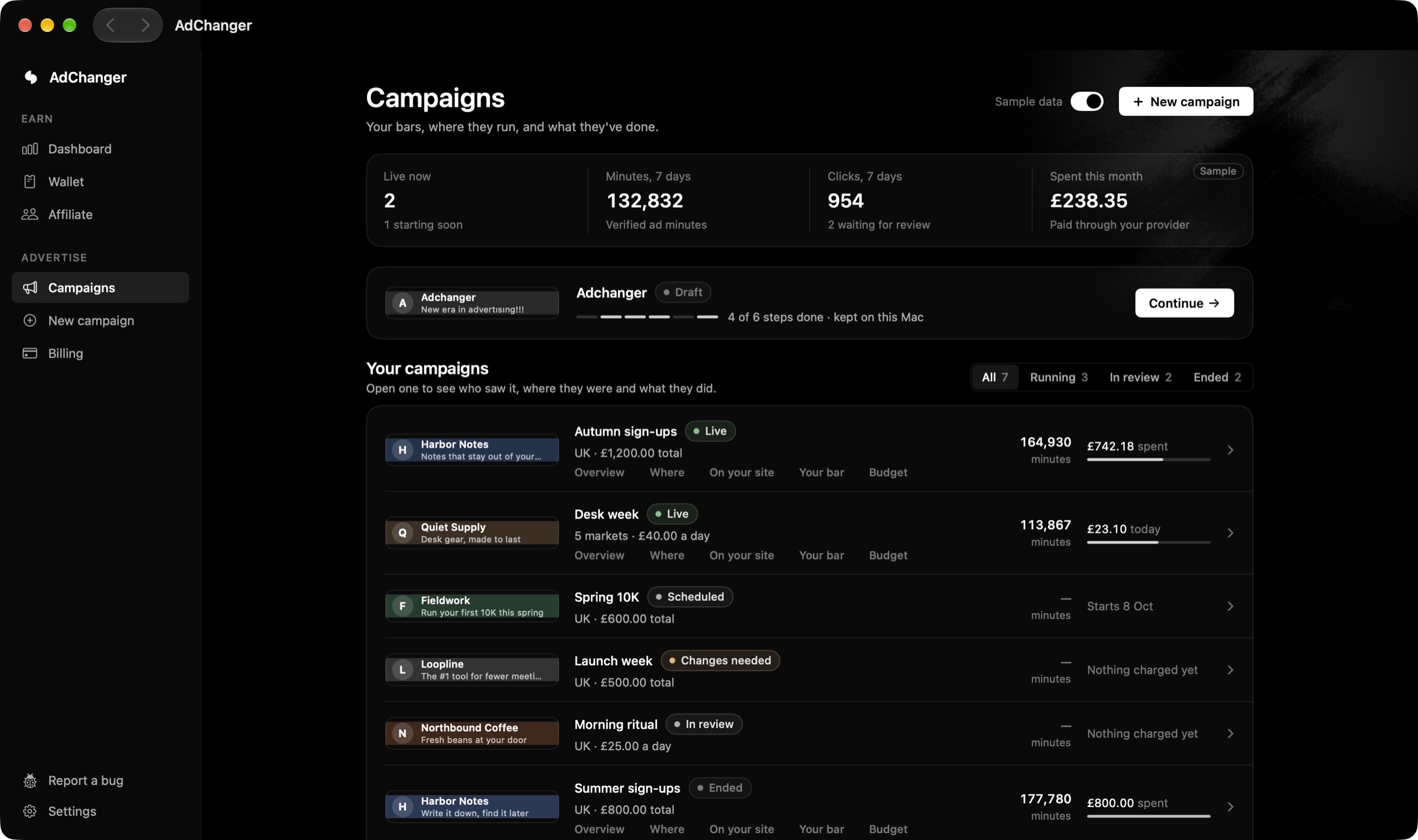
Every campaign in one list
Live, scheduled, in review or ended. Each row shows the bar, the minutes it was seen and what has been spent. Open one to see who saw it and what it did.
These are the real screens of the AdChanger app. The numbers are sample data, so you can see how it looks with results in it.
- Ways to pay
- Whop
- Stripe Soon
- Wise Soon
- PayPal Soon
Questions
Straight answers.
What is MacAd?
What is a verified minute?
Who sees my bar?
What do advertisers see in their results?
How do I pay?
Is every ad allowed?
Your brand, next to the clock. Paid by the minute.
Build your bar in a minute. A person checks it, then it runs.

How a minute is counted
One honest unit. You earn every one.
Install it once and forget it. It sits next to your clock, and every minute it is seen while you use your Mac puts money in your wallet.
- 1
On screen
The bar sits in your menu bar, next to the clock. Nothing pops up, nothing plays.
- 2
In use
You are at your Mac, using it. Step away and the clock waits; close the lid and it starts over.
- 3
Counted
After 60 seconds: one verified minute. The brand pays £0.004 and £0.0026 of it is yours.
What you earn
Every minute, split in the open.
£0.004an advertiser pays for one verified minute, £4.00 per 1,000.
- You, the person with the Mac65% · £0.0026
- AdChanger35% · £0.0014
- You70% · £0.0028
- The person whose code you used5% · £0.0002
- AdChanger25% · £0.0010
Using a code takes 10 points from AdChanger’s share: 5 go to you and 5 to the person who shared it. The price stays the same.
Why we print all of this.Honesty. People who host the ad and businesses who pay for it both deserve to know exactly where every minute’s money goes, so we show it to everyone, before anyone signs up.
- Ways to get paid
- Whop
- Stripe Soon
- Wise Soon
- PayPal Soon
Launch prices. Earnings depend on the ads running for your country and how long your Mac is awake and in use.
Inside the app
Watch it add up. Take it out.
The real screens, with sample money in them: what your bar earned, your wallet, and what the friends you bring in add.
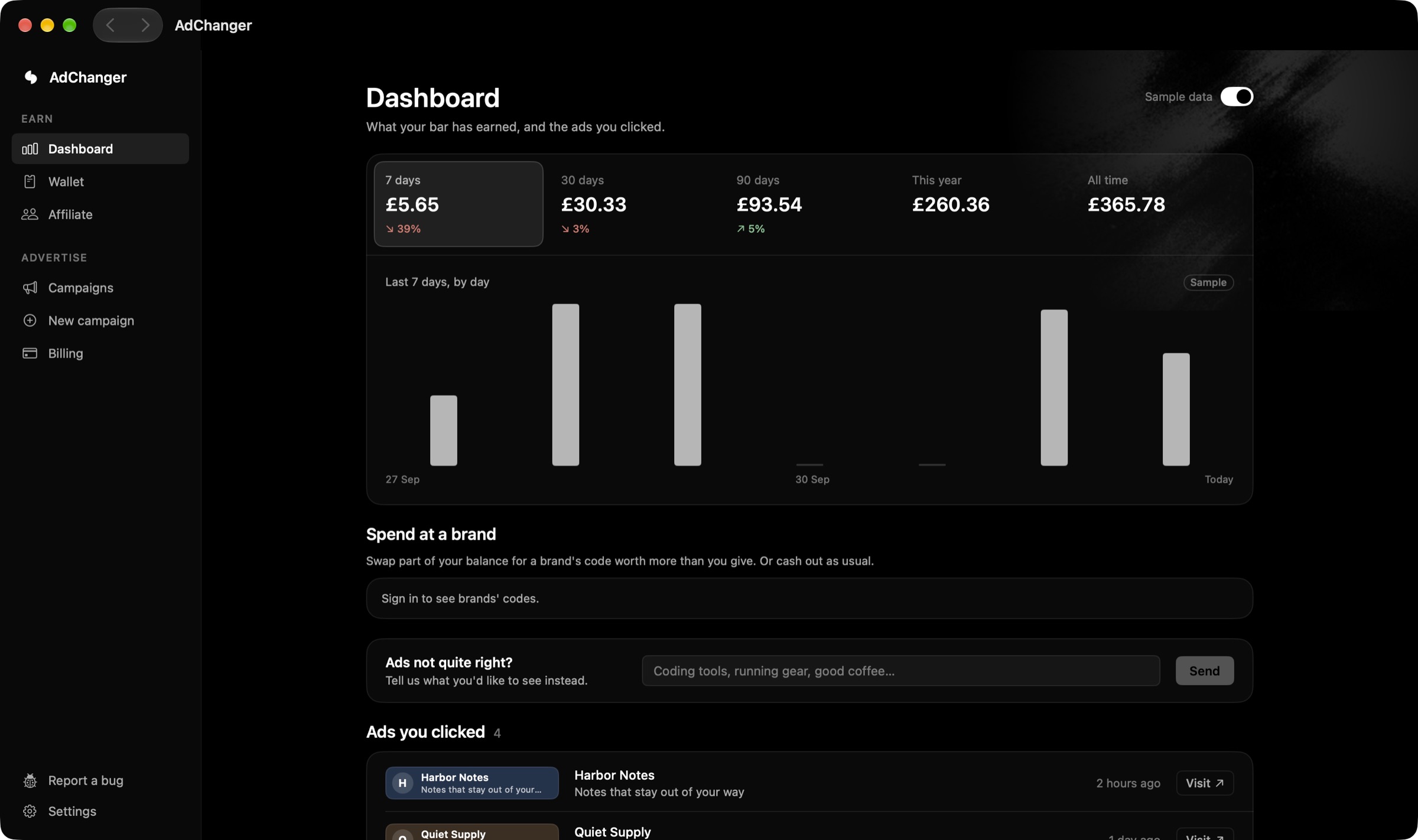
Your earnings, at a glance
What your bar earned over 7 days, 30 days, 90 days, this year and all time. Every day on one chart, and every ad you clicked, kept so you can find it again.
These are the real screens of the AdChanger app. The numbers are sample data, so you can see how it looks with results in it.
Privacy
It counts minutes. It doesn’t watch you.
MacAd only needs to know whether your Mac is awake and in use. Brands get totals, never you.
- Never sees: Your screen
- Never sees: What you type
- Never sees: Your microphone or camera
- Never sees: What’s inside your apps
- Never sees: Your browsing history
Questions